
Van prompt naar 3D-model: een AI-werkstroom voor tekst-naar-mesh en afbeelding-naar-mesh generatie
/
Van prompt naar 3D-model: een AI-werkstroom voor tekst-naar-mesh en afbeelding-naar-mesh generatie
AI-modellen die automatisch 3D-modellen genereren op basis van tekst of afbeeldingen klinken als sciencefiction, maar ze zijn vandaag de dag een realiteit. Dankzij technieken zoals text-to-mesh en image-to-mesh kunnen digitale 3D-objecten sneller dan ooit worden gemaakt. Dit is ideaal voor toepassingen in games, AR/VR of productvisualisatie. In deze blogpost zal ik dieper ingaan op hoe deze modellen werken, hoe goed ze presteren en welke tools momenteel beschikbaar zijn. Ik zal een complete workflow laten zien: van invoer naar mesh, met concrete voorbeelden en technische inzichten. Dit zal je een duidelijk beeld geven van wat vandaag de dag al mogelijk is en waar de uitdagingen nog liggen.
Main section
Wat zijn deze modellen en hoe kan ik ermee beginnen?
Waarom tekst-naar-mesh en afbeelding-naar-mesh interessant zijn
De mogelijkheid om automatisch 3D-modellen te genereren op basis van tekst of afbeeldingen opent nieuwe deuren in verschillende sectoren. Wat vroeger uren modelleren in Blender of Maya vereiste, kan nu in slechts enkele minuten worden bereikt met de hulp van AI. Dit maakt text-to-mesh en image-to-mesh technologieën bijzonder waardevol in workflows waar snelheid, iteratie en creativiteit centraal staan.
Voor game-ontwikkelaars betekent dit dat ze prototypes sneller kunnen bouwen of placeholder-assets kunnen genereren op basis van visuele referenties of conceptprompts. In AR/VR-ontwikkeling kunnen ontwikkelaars interactieve 3D-inhoud op een toegankelijke manier creëren die dynamisch wordt gegenereerd op basis van de context van de gebruiker.
Ontwerpers, zowel grafisch als industrieel, kunnen ideeën visualiseren met deze tools zonder uitgebreide ervaring in 3D-modellering. Denk aan productontwerp, interieurvisualisatie of virtuele kleding in een digitale paskamer. Voor hen verlaagt deze technologie de drempel voor 3D-visualisatie aanzienlijk.
Er zijn duidelijke voordelen, zelfs binnen R&D-omgevingen. Bijvoorbeeld, in simulaties, robotica of machine learning-pijplijnen waar synthetische gegevens vereist zijn: AI-gegenereerde netwerken kunnen dienen als trainingsgegevens, of kunnen zelfs in real-time worden aangepast op basis van invoer.
Ten slotte is er het aspect van automatisering. In workflows waar snelheid en schaalbaarheid essentieel zijn — zoals e-commerce (productvoorbeelden), digitale erfgoedconservering of creatieve contentgeneratie — kunnen tekst/afbeelding-naar-mesh-pijplijnen worden gekoppeld aan andere AI-modules. Dit creëert een bijna volledig geautomatiseerde 3D-productieketen, van prompt tot geoptimaliseerd model.
Workflow: Van afbeeldingsprompt naar mesh
De kracht van deze AI-tools ligt niet alleen in wat ze genereren, maar ook in hoe gemakkelijk ze kunnen worden geïntegreerd in bestaande 3D-werkstromen. Hieronder zal ik een praktische pijplijn demonstreren.
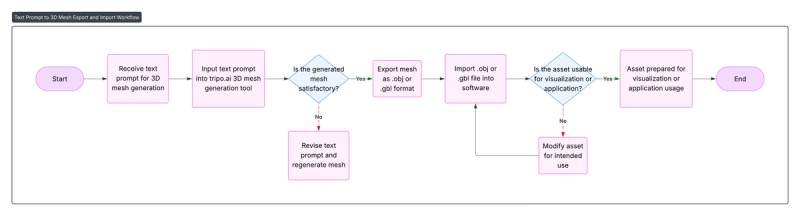
Tekst-naar-Mesh Workflow
Het lijkt erop dat er geen inhoud is opgegeven voor vertaling. Geef alstublieft de tekst die u wilt dat ik naar het Nederlands vertaal.Beschrijvende tekstprompt
Tool:Tripo.ai (of andere nuttige opties)
Output3D-mesh (.obj / .gbl)
Korte technische uitleg: Hoe werken deze modellen?
Text-naar-mesh en afbeelding-naar-mesh modellen maken gebruik van verschillende neurale representaties en optimalisatietechnieken om een 3D-mesh te genereren vanuit een tekstprompt of afbeelding. De gebruikte methoden verschillen aanzienlijk in structuur, schaalbaarheid en outputkwaliteit. Hieronder bespreken we enkele belangrijke concepten die je zullen helpen deze modellen beter te begrijpen.
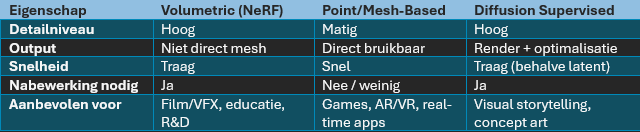
Volumetrische Representaties (op basis van NeRF)
Veel modellen zoals DreamFusion of Magic3D zijn gebaseerd op NeRF's (Neural Radiance Fields). In deze benadering wordt een 3D-object niet weergegeven als een mesh of puntenwolk, maar als een volumetrisch veld. Elk punt in de 3D-ruimte heeft een kleur en een dichtheid, geleerd via een neurale netwerkfunctie.
- Voordeel: Continue en gedetailleerd, realistisch weer te geven via differentieerbare rendering.
- Nadeel: De output is aanvankelijk geen mesh. Je moet een marching cubes-algoritme gebruiken om er een mesh van te maken, wat soms kan resulteren in een ruwe of holle output.
Puntgebaseerde en expliciete meshrepresentaties
Modellen zoals Shap-E en Point-E werken rechtstreeks met punten- of meshstructuren. Ze voorspellen bijvoorbeeld een puntenwolk of mesh-vertices die onmiddellijk kunnen worden gebruikt als geometrische output.
- Voordeel: Sneller en directer inzetbaar voor game-engines of 3D-tools. Geen extra conversiestap vereist.
- Nadeel: Moeilijker om fijne details of texturen weer te geven, vooral in kleinere objecten.
Diffusiemodellen voor 3D (Latent of Gerenderd)
Een toenemend aantal modellen maakt gebruik van diffusieprocessen, zoals DreamFusion doet met "Score Distillation Sampling." Het idee: een tekstprompt wordt gebruikt in combinatie met een 2D tekst-naar-beeld diffusie model (zoals Imagen of Stable Diffusion), dat beelden genereert vanuit verschillende hoeken. Deze renders worden vervolgens gebruikt als doelen om een onderliggende 3D-representatie te optimaliseren (bijv. NeRF).
- Render-gebaseerde supervisie: De gegenereerde 3D-representatie wordt vanuit meerdere hoeken gerenderd, en die renders moeten lijken op afbeeldingen die zijn gegenereerd door het 2D-diffusiemodel. Op basis hiervan worden de 3D-parameters bijgewerkt.
- Latente optimalisatie: Sommige nieuwe methoden (zoals Meshy.ai) opereren volledig in de latente ruimte van het diffusie model en vermijden expliciete renderloops, waardoor ze sneller en schaalbaarder zijn.
CLIP-begeleiding en tekstembedding-matching
Sommige oudere of lichtere systemen gebruiken CLIP-gebaseerd verlies, waarbij gerenderde afbeeldingen van het 3D-model worden vergeleken met de oorspronkelijke tekstprompt met behulp van een visie-taalencoder zoals CLIP.
- De render is gecodeerd door CLIP, net als de prompt, en de cosinusovereenkomst wordt gemaximaliseerd.
- Minder nauwkeurig dan pure diffusie supervisie, maar computationeel lichter.
Vergelijking van modellen
In dit gedeelte testen we verschillende AI-tools en modellen die momenteel beschikbaar zijn voor tekst-naar-mesh en afbeelding-naar-mesh generatie. We vergelijken de resultaten op basis van dezelfde invoer (tekstprompt of afbeelding) om te zien hoe goed elk model presteert op het gebied van detail, vormconsistentie, textuurkwaliteit en gebruiksgemak.
Text-Tot-Meshing
De volgende 3 modellen werden gebruikt voor de tests:
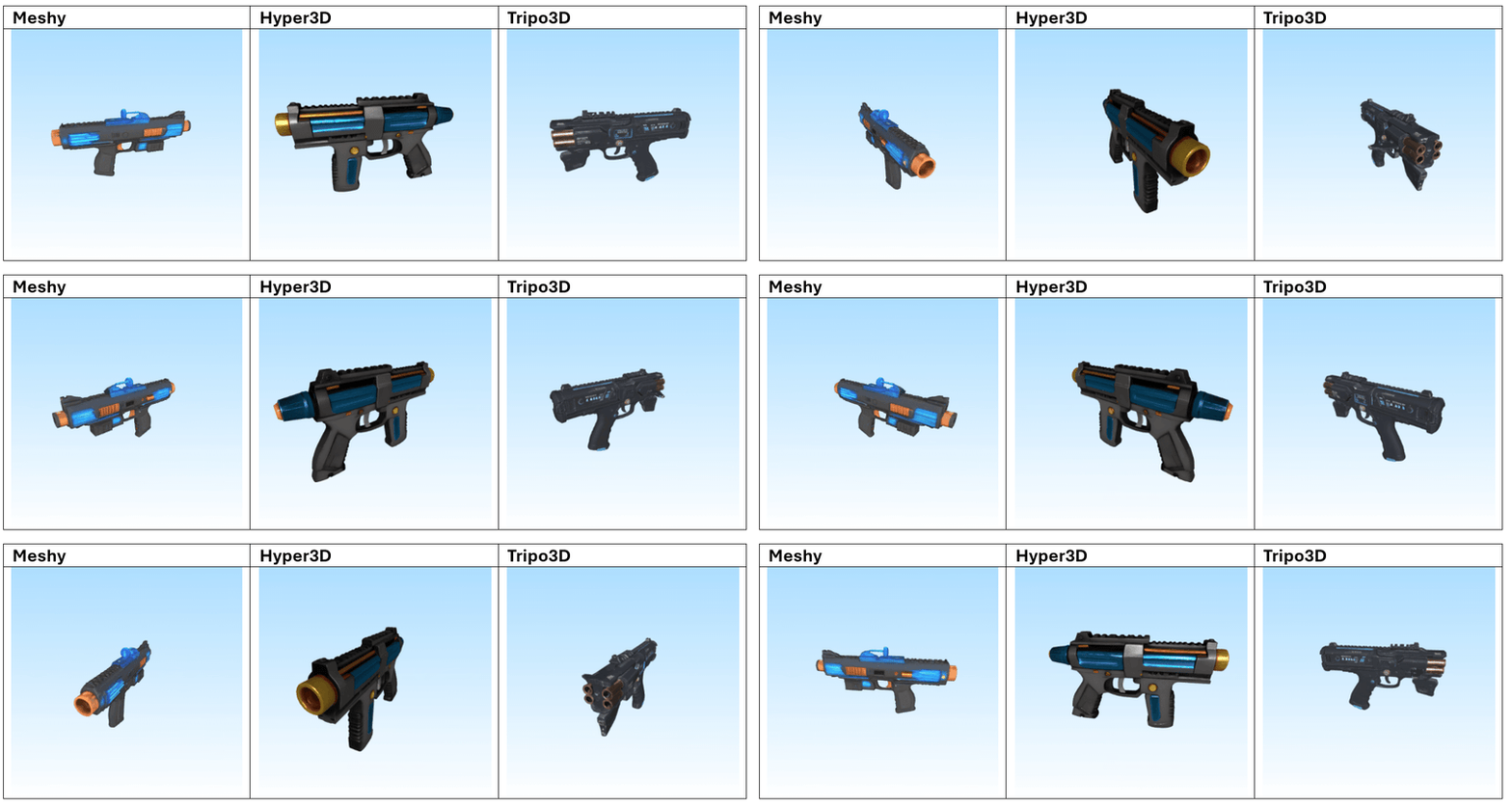
Futuristische Plasma Blaster
"Een futuristische handgehouden plasma-blaster ontworpen voor elite ruimte-mariniers. Het wapen heeft een slank, matzwarte carbonfiber behuizing met gloeiende blauwe energiegeleiders die langs de loop lopen. De voorkant huisvest een roterend tri-nozzle mechanisme omgeven door koperen koelvinnen. De ergonomische grip is voorzien van een textuur met donker rubberen padding en bevat een klein digitaal munitieteller scherm met groene LED-lampen. Verschillende kleine waarschuwingsstickers en gegraveerde serienummers zijn in het metaal nabij de trekkerbehuizing geëtst."
Organische Boom
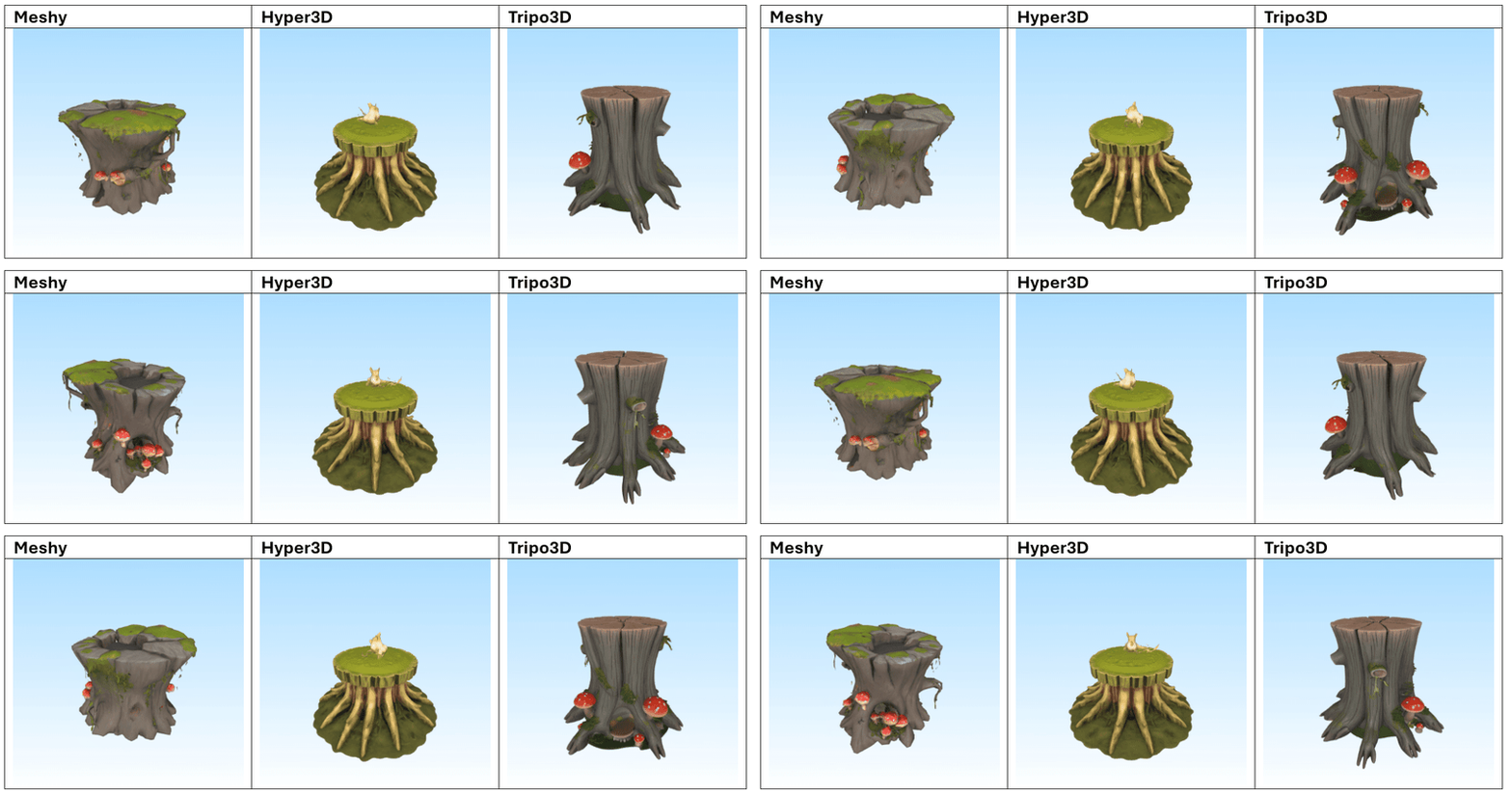
Een grote, knoestige boomstronk van een bosboom met dikke, met mos bedekte schors en meerdere verwrongen wortels die zich naar buiten uitstrekken. Het bovenste oppervlak is ongelijk en gebarsten, met een ondiepe plas regenwater die licht weerkaatst. Kleine paddenstoelen met rode hoeden en witte stippen groeien langs de zijkant, en een klein uitgehold eekhoornhol is zichtbaar nabij de basis. De schors toont fijne details zoals verticale nerf lijnen en afbladderende texturen, met wijnstokken die over één rand hangen. De verlichting benadrukt de vochtig en de organische complexiteit van het hout.
Afbeelding-naar-Mesh
De volgende 3 modellen werden gebruikt voor de tests:
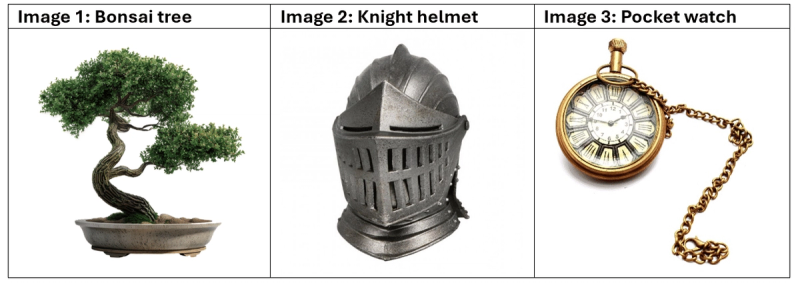
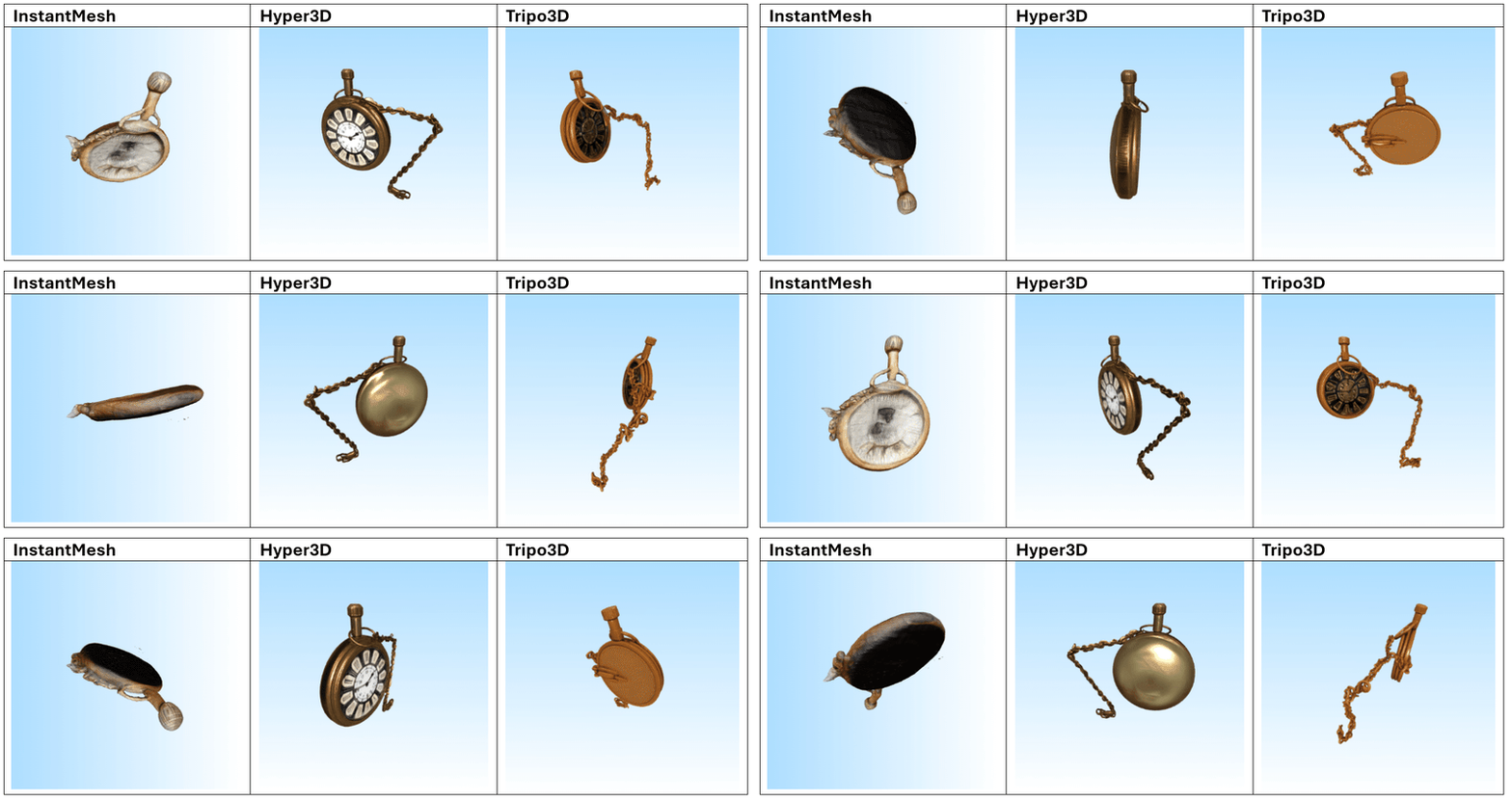
Dit zijn de 3 afbeeldingen die we als prompts hebben gebruikt:
Resultaten
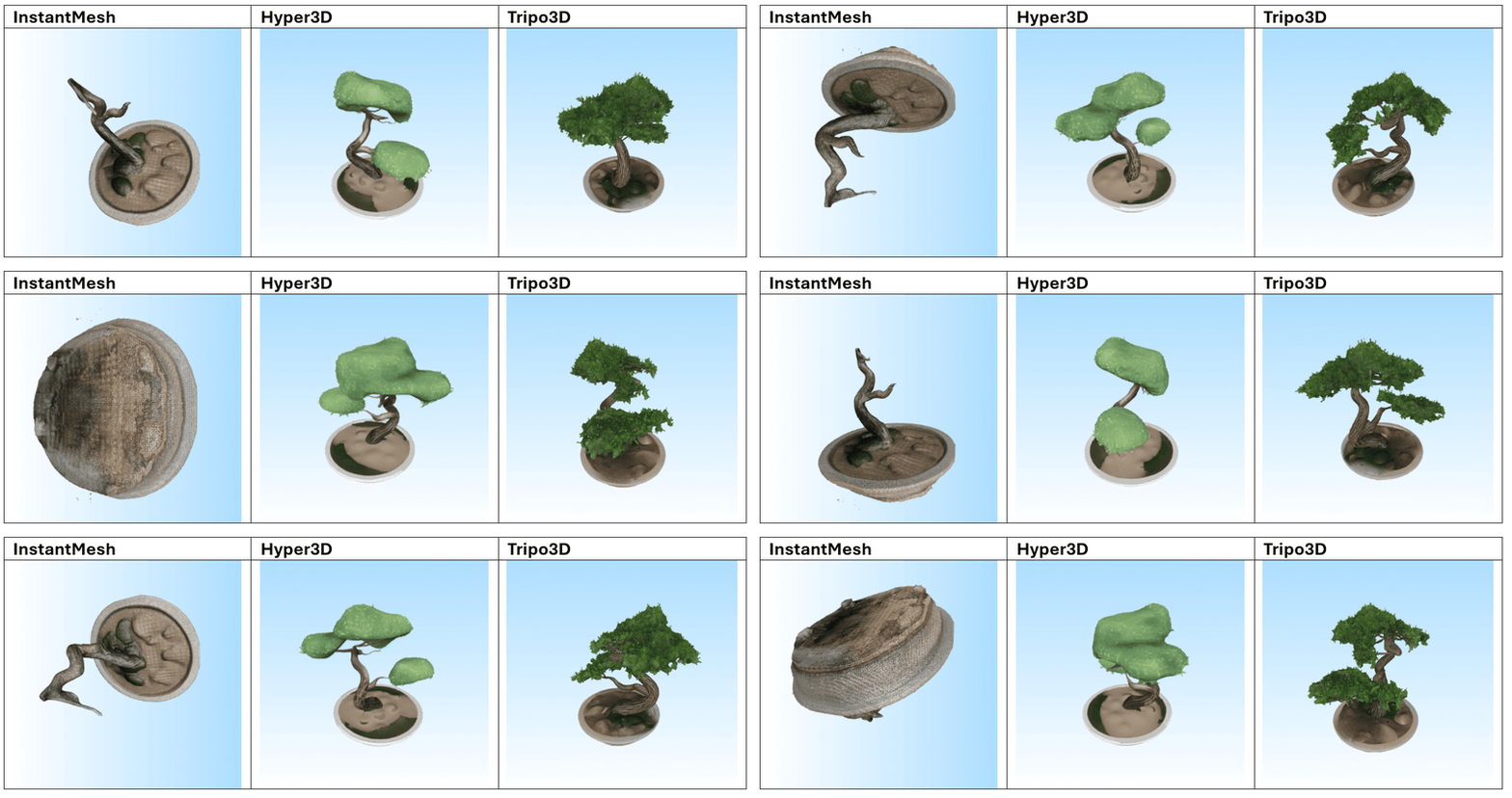
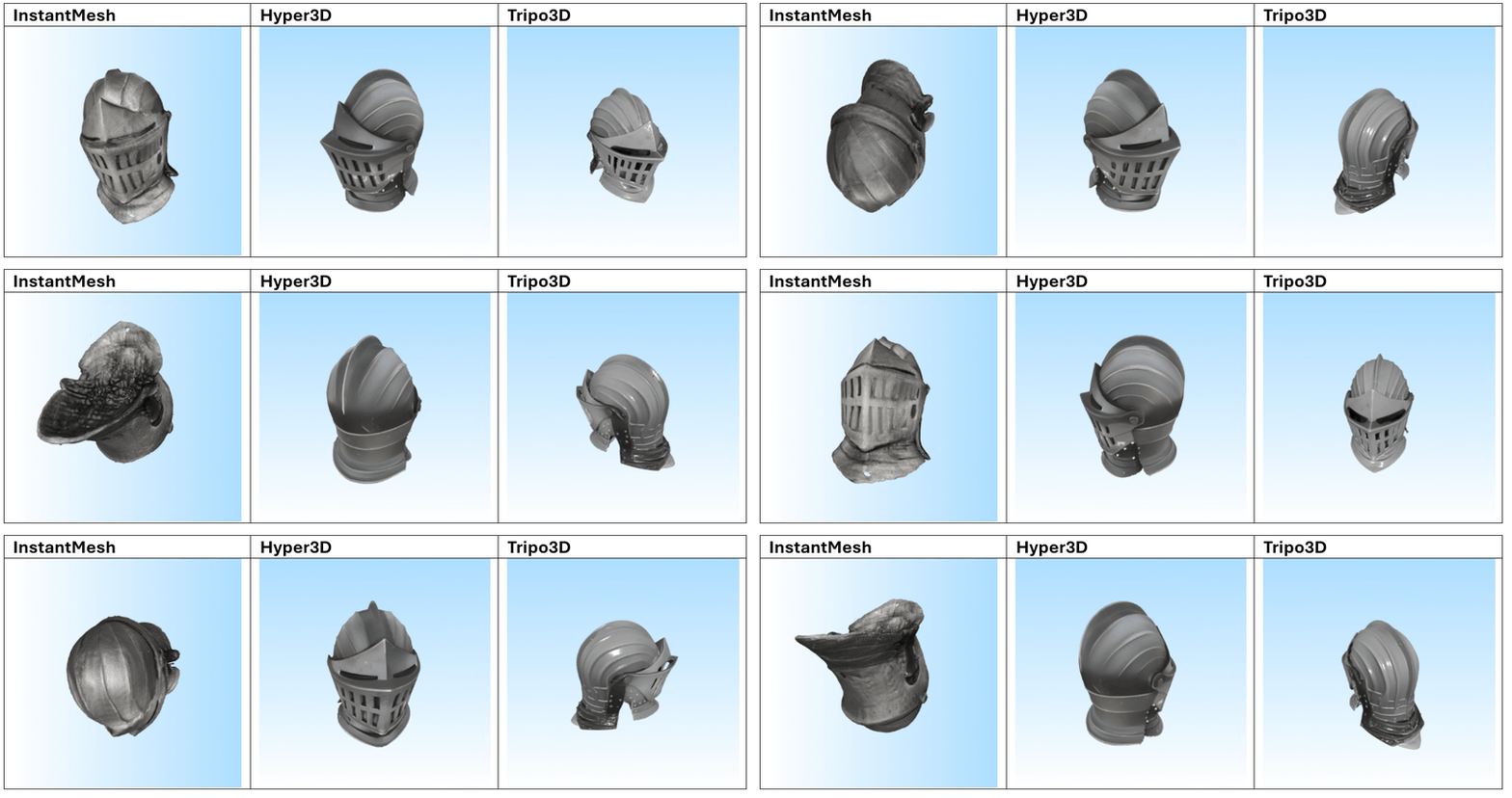
Na het testen van meerdere prompts blijkt dat Tripo3D de meest consistente en indrukwekkende resultaten levert, zowel in tekst-naar-mesh als in afbeelding-naar-mesh. De gegenereerde modellen vertonen een hoge geometrische complexiteit in combinatie met scherpe, goed toegepaste texturen. De modellen zijn over het algemeen klaar voor direct gebruik in visualisatie- of prototypingworkflows.
Hyper3D en Meshy.ai presteren vergelijkbaar, maar verschillen iets afhankelijk van de prompt. Meshy.ai blinkt soms uit in textuurgebruik en herkenbaarheid, terwijl Hyper3D sterk is in meshstructuur. Beide vereisen echter vaak aanvullende nabewerking wanneer het model in een productieomgeving wordt gebruikt.
InstantMesh scoort duidelijk het laagst. Het model heeft moeite met complexe vormen en produceert vaak generieke of inconsistente resultaten met gedetailleerde invoer. Eenvoudige objecten zoals meubels, potten of standaarden zijn beheersbaar, maar verder gebruik is beperkt.
Toepassingen in de industrie
Hoewel tekst-naar-mesh en afbeelding-naar-mesh modellen vaak worden geassocieerd met creatieve sectoren zoals gaming en AR/VR, reikt hun potentieel veel verder dan dat. Deze technologieën kunnen ook aanzienlijke toegevoegde waarde bieden in industriële omgevingen, onderwijs en gezondheidszorg.
Een belangrijk voorbeeld is digitale tweeling — de virtuele reconstructie van fysieke objecten of systemen. Met behulp van een afbeelding of tekstbeschrijving kan een AI-model snel een digitale representatie genereren van bijvoorbeeld een machineonderdeel of mechanisch systeem. Dit versnelt het ontwerpproces en maakt onderhoud en simulatiemodellen toegankelijker.
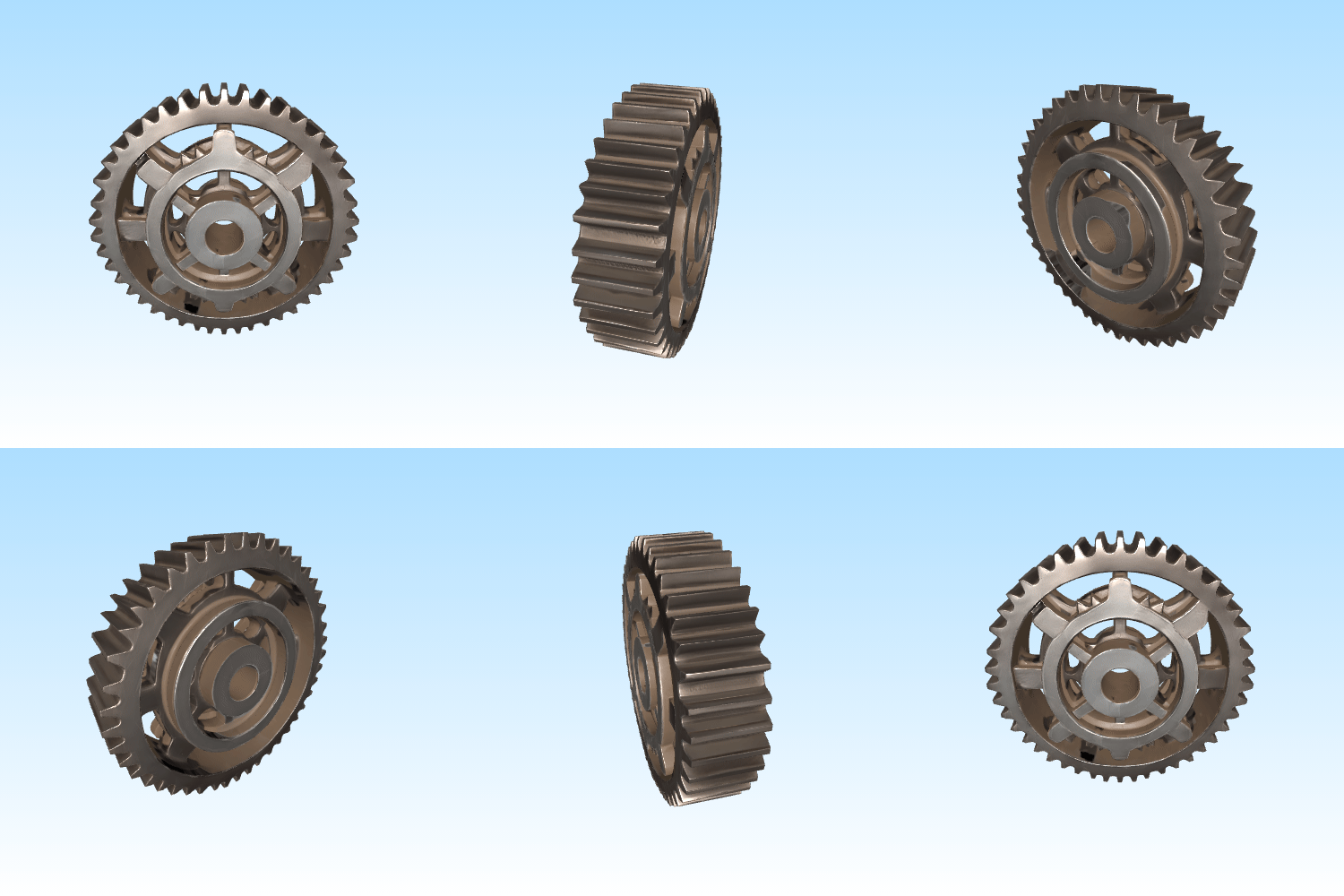
Interactieve 3D-representatie van een tandwielsysteem:
In de gezondheidszorg en medische opleiding kan door AI gegenereerde 3D-inhoud een belangrijke rol spelen. Denk aan het visualiseren van complexe anatomische structuren op basis van beschrijvingen of medische beelden. Dit maakt abstracte concepten tastbaarder voor studenten of patiënten.
Anatomisch 3D-model van het menselijke hart voor educatief gebruik
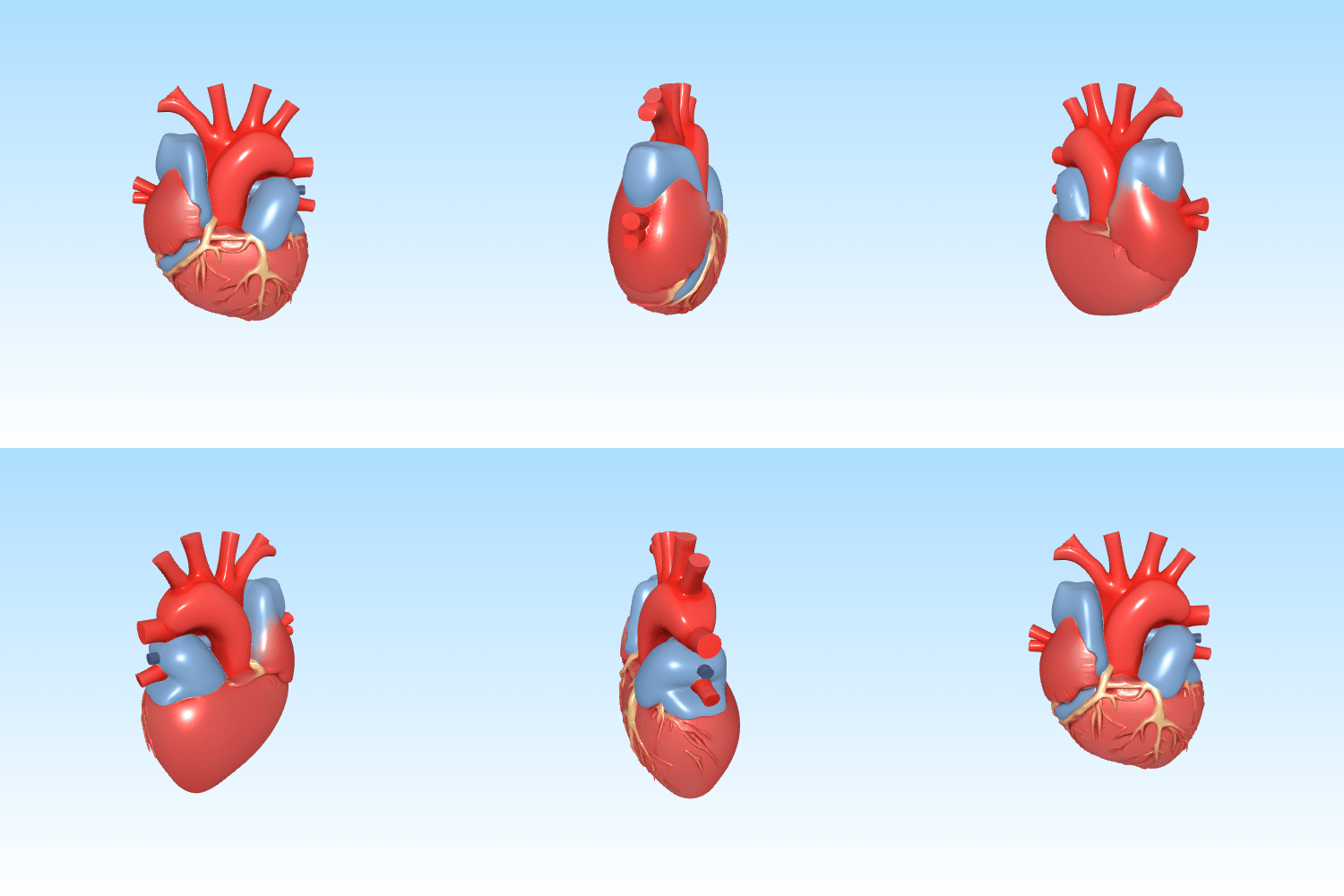
Door deze technologieën te koppelen aan interactieve platforms of AR-headsets, kunnen gebruikers intuïtiever leren, trainen of plannen — zonder kostbare handmatige modellering.
Beperkingen en Realisme: Welke uitdagingen staan we vandaag de dag nog steeds voor?
Hoewel AI-tools indrukwekkende 3D-modellen kunnen genereren, zijn er nog steeds duidelijke beperkingen wanneer je ze wilt implementeren in professionele workflows.
Meshkwaliteit
De gegenereerde netwerken zijn vaak ruw, bevatten te veel polygonen of hebben artefacten zoals gaten of zwevende vertices. Retopologie is meestal noodzakelijk.
Inconsistente renders
In NeRF-gebaseerde modellen zijn de voor- en zijaanzichten meestal goed gerenderd, maar de achterkant bevat vaak ruis of is niet goed gedefinieerd. Dit komt door een gebrek aan zichtbare trainingszichtingen.
UV-mapping en texturen
Veel modellen bieden geen goede UV-unwrapping of hoogwaardige texturen. Je krijgt vertexkleuren of generieke diffuse kaarten, die verdere nabewerking vereisen.
Fantasie en Interpretatieve Fouten
AI verzint soms details waar er onvoldoende input is. Als gevolg hiervan krijg je objecten die er vanuit één hoek goed uitzien, maar structureel onjuist zijn.
Geen schaal of maatstaf
Modellen leveren objecten zonder consistente schaal of afmetingen. Een paar brillen kan zo groot zijn als een auto.
Bottom section
Toekomst en Automatisering: AI als Bouwsteen in 3D-Pijplijnen
De grootste waarde van tekst-naar-mesh en afbeelding-naar-mesh modellen ligt in hun potentieel voor automatisering. In plaats van handmatig elk 3D-model te ontwerpen, kunnen ze dienen als een startpunt binnen een grotere contentpipeline.
Stel je een AR/VR-omgeving voor waarin objecten automatisch worden gegenereerd op basis van context of gebruikersinvoer. Bijvoorbeeld, een gebruiker beschrijft "een middeleeuws schild," en binnen enkele seconden verschijnt het als een interactief object in een virtuele wereld. In game-engines zouden deze modellen automatisch placeholder-assets, omgevingsobjecten of zelfs NPC's kunnen genereren tijdens het ontwerpen van niveaus.
In e-commerce of digitale tweelingtoepassingen kan AI 3D-modellen creëren op basis van bestaande foto's of beschrijvingen van producten, wat de schaalbaarheid van 3D-catalogi aanzienlijk vergroot.
Door deze tools te koppelen aan bestaande software (zoals Unity, Blender of Houdini) en ze te combineren met AI-agenten of promptgeneratoren, kunnen volledig semi-automatische pipelines worden gecreëerd — van tekst of afbeelding naar bruikbare, geoptimaliseerde 3D-inhoud.
Kortom: deze modellen zullen het creatieve proces in de toekomst niet vervangen, maar ze zullen het drastisch versnellen en toegankelijker maken.
Sluiting
AI-gestuurde 3D-generatie bevindt zich nog in de kinderschoenen, maar toont al enorm potentieel voor snellere, flexibelere workflows. Of je nu werkt aan een game, AR-toepassing of productvisualisatie, deze tools kunnen een aanzienlijk verschil maken in snelheid en creativiteit.
Contributors
Authors
/
Hube Knaepkens, intern
/
Jens Krijgsman, Lead & Automation & AI researcher
Want to know more about our team?
Visit the team page